AI that learns how you want it to respond.

Preferent is preference-learning infrastructure. Mark what you dislike in a reply, and every model and agent you use applies the correction.

The demonstration

Every model writes with habits. Preferent names each one.

The first panel shows a model reply with each habit marked. The second panel shows the reply after Preferent. Hover over a marked span, or tab to it, to read the habit and the text you would write instead.

Before Preferent

4 marks

Our planning meeting ran long today. Write a short note to the team: the launch moved to May 12, Ana owns the QA plan, and we dropped the dark mode feature.

Hi team, thanks for staying engaged in today’s planning meeting. (Praise opener) I wanted to recap the key decisions we made. (Wrapper) We’re moving our launch date to May 12 to ensure we have adequate (Inflated word) time for proper testing and refinement. Ana will be taking ownership of the QA plan, so please coordinate with her as needed on quality assurance efforts. We’ve also decided to drop the dark mode feature from this release to help us stay focused on our core priorities. Thanks for your flexibility as we work through these adjustments together. (Wrapper)
After Preferent

Same prompt, same model, with the catalogue

Our planning meeting ran long today. Write a short note to the team: the launch moved to May 12, Ana owns the QA plan, and we dropped the dark mode feature.

We moved the launch to May 12. Ana owns the QA plan. We dropped the dark mode feature.

Habit 1 of 4

Praise opener

The writer opens by praising the question or the reader, or by agreeing with a correction, before giving any content.

Text you mark

Hi team, thanks for staying engaged in today’s planning meeting.

Text you prefer

Hi team,

Both replies are unedited, from Claude Haiku 4.5 in our October 30 catalogue test. The first reply had no style guide. The second had the catalogue as its style guide.

How it works

Mark the text, apply your style guide, and measure the change.

You teach Preferent by example. Every correction adds to your style guide, which Preferent applies to every later reply.

  1. 01

    Mark

    Select a span in a model reply, name the habit, and write the text you prefer. Every mark becomes a preference pair.

  2. 02

    Apply

    Preferent applies your style guide to model replies. You use one style guide across models and agents.

  3. 03

    Measure

    In the eval, you read a reply written before Preferent next to a reply written after Preferent.

The product

Your style guide, versioned.

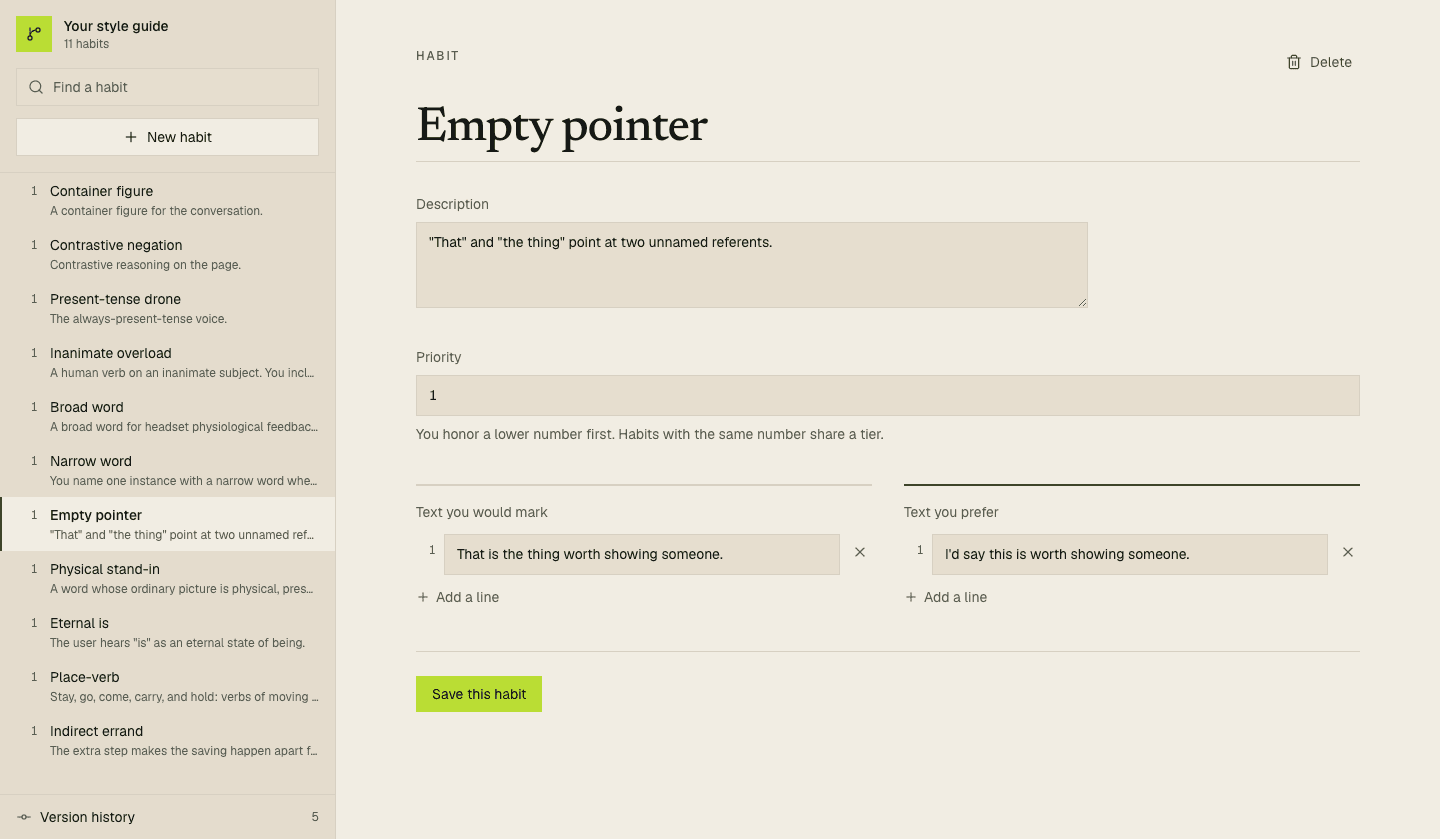
Each account has a versioned style guide, forked from the Preferent catalogue. You edit it to match your own voice or the house style of your team.

https://preferent.ai/style-guide
Your Preferent style guide open to the Empty pointer habit, with the habit list, a description, text you would mark, and text you prefer.Your Preferent style guide open to the Empty pointer habit, with the habit list, a description, text you would mark, and text you prefer.
  • Style guide workspace

    You add, edit, and prioritize habits, and you read every earlier version of your style guide.

  • Eval

    You compare a reply before Preferent with a reply after Preferent, side by side.

  • Text and voice

    Your style guide applies to written replies and to spoken replies, which you can interrupt whenever you want.

The Preferent catalogue

A named taxonomy of model writing habits.

Preferent Inc. maintains the catalogue of 19 habits. Each habit has a definition, a yes/no test, and pairs of the text you mark and the text you prefer. Every account receives a style guide forked from the catalogue.

  • FrameTier 1

    Wrapper

    The writer opens or closes the reply with text that announces the answer, restates it, or offers more help, before or after the answer itself.

    Mark

    Here's a quick overview of the museum hours. The museum opens at 9 a.m. on weekdays.

    Prefer

    The museum opens at 9 a.m. on weekdays.

  • Sentence shapeTier 1

    Contrastive negation

    The writer denies a claim that nobody made, then states the real point.

    Mark

    The meeting wasn't about the budget. It was about the timeline.

    Prefer

    The team spent the meeting on the timeline.

  • Word choiceTier 1

    Empty pointer

    The writer uses this, that, or a phrase such as the thing or the key without a noun, so the reader has to reconstruct what the word refers to.

    Mark

    The tests pass on Linux but fail on macOS. That is the thing to fix first.

    Prefer

    The tests pass on Linux but fail on macOS. I would fix the macOS failure first.

  • Word choiceTier 1

    Inflated word

    The writer picks a formal or elevated word where a plain word means the same thing, such as delve, leverage, utilize, robust, seamless, pivotal, or crucial.

    Mark

    Let's delve into the error log.

    Prefer

    Let's look at the error log.

  • Sentence shape

    Slogan line

    The writer punctuates a point with a short quotable sentence, a fragment, or a question they answer at once, and adds no new fact.

  • Sentence shape

    Hedge stack

    The writer qualifies one claim with two or more hedges, or opens with a phrase such as it's worth noting that.

  • Sentence shape

    Indirect errand

    The writer reports an action that they did, or that a helper finished for them, as a request, an arrangement, or a passive with no actor, so the reader cannot tell who did it or whether it happened.

  • Sentence shape

    Dot chain

    The writer joins labels, values, or clauses with middots (·), vertical bars, or a run of em dashes in place of a sentence, a list, or labelled fields.

  • Word choice

    Broad word

    The writer uses a general word such as thing, aspect, element, factor, issue, or signal where the context already supplies a more specific term.

  • Figure

    Inanimate overload

    The writer gives a non-human subject a verb of speech, feeling, intent, posture, or carrying that only a person or an animal can do.

See the full catalogue

All 19 habits, with tests and examples, and the steps to use them in ChatGPT, Claude, Cursor, or Grok without an account.

Who Preferent serves

For people who already write down how a model should write.

People who write rules files

You keep CLAUDE.md or .cursor/rules for your coding agents, and you rewrite the same corrections every week.

You write each rule once, as a named habit with the text you mark and the text you prefer.

Teams with a house style

Your team keeps a style guide, and an editor reads every model reply before anyone publishes it.

You write your house style as named habits, with an example of each, and Preferent applies your style guide to every reply.

Research and direction

Where Preferent is heading.

Preferent keeps one preference model for each person and adds evidence to it in layers. We measure each new method with a blind eval before we release it.

  • Export and MCP

    Available

    You export your style guide as a CLAUDE.md or .cursor/rules file, or you connect an agent to the MCP endpoint so it reads your latest version.

    Connect a tool
  • Public catalogue

    Available

    Every habit has a test and examples, and you can copy the catalogue into ChatGPT, Claude, Cursor, or Grok without an account.

    Read the catalogue

Evidence for one preference model

Every layer adds evidence about the same preferences. Preferent stores each preference apart from the evidence for it, so you can see which evidence supports each line in your style guide.

  1. Now01

    Explicit corrections

    You mark text in a reply, write the text you prefer, and edit your style guide. Each mark records where it came from and when.

  2. Next02

    Behavioral signals

    We plan to learn from what you do with a reply: an interruption, a regeneration, or an edit you make after the fact.

  3. Research03

    Physiological signals

    We will test whether physiological signals predict your preferences beyond the explicit and behavioral evidence. We do not count discomfort as a dislike until a study shows how the two relate.

In research

  • Habit detectors

    In research

    Preferent runs one detector per habit to flag spans in model output, and you read a count of each habit per 1,000 words.

  • Overlay

    In research

    Preferent generates a reply, detects each habit, and rewrites the flagged spans before you read the reply.

  • Public leaderboard

    In research

    We publish habit rates across models, measured with the same detectors, for anyone to compare.

  • Per-user steering

    In research

    We test steering vectors and preference fine-tuning on open models, trained on the pairs you mark.

  • Voice

    In research

    We map the same preferences to speech, such as how long a spoken reply runs and when the model yields the turn.

Teach every model how you want it to respond.

A free account gives you your own copy of the Preferent catalogue. Mark what you dislike in a reply, then connect the tools you use.